Web Scraping· Last updated: September 2026
AllMenus API: Is There One? Menu Data Access Options (2026)
Quick answer
Nenodata’s AllMenus data scraping and API-delivery services give you restaurant, menu, item, and price records from public AllMenus pages, delivered as JSON, CSV, or a REST endpoint on the schedule you set — with the coverage, fields, and refresh cadence scoped to your project. Note that AllMenus itself does not offer a public API today; the older private REST API and its developer.allmenus.com portal (the host the unofficial allmenus Ruby gem was written against) are no longer available.
- The old API
- REST, XML responses, API key required, listed as private use only. No public sign-up remains.
- The developer portal
- developer.allmenus.com, referenced by the unofficial allmenus Ruby gem, is defunct. Code written against it will not run.
- Nenodata delivers
- Custom AllMenus data scraping and API delivery — restaurant, menu, item, and price records from public pages, in JSON, CSV, or REST, on the schedule you set.
Most pages ranking for this term never answer the question — they sell a scraper or describe menu data in general. Below is what the public record actually shows about AllMenus API access, followed by the two paths that work today, with runnable code for both.
Illustrative menu hierarchy
RESTAURANT
Tony's BistroAustin, TX
MENU
Lunch Menu
CATEGORY
Appetizers
ITEM
Bruschetta$7.99
Structured API data
JSON · CSV · API
The head question
Is there an official AllMenus API?
No. There is no public AllMenus API you can sign up for today. Here is what the public record shows.
- An API did exist. AllMenus was listed with a REST API that returned XML and required an API key. The listing marked it private use only, which means access was granted case by case rather than through open registration.
- The developer portal is gone. The unofficial
allmenusRuby gem was written against developer.allmenus.com. That host no longer serves working documentation or a sign-up flow, so the gem's endpoints fail at the request stage. Treat the library as a historical reference. - What ranks today is not official. Most results for this query are marketplace scraper listings, third-party food data vendors, or that archived wrapper. None of them are official access, and none of them can grant it.
A private or partner arrangement may still exist for specific businesses. There is simply no public path to one, so the practical question stops being “where do I get the key” and becomes “which data path do I build on.”
Whatever you choose, ask the provider directly:
- Is this official access, an unofficial wrapper, a scraper API, or a managed feed?
- Are you affiliated with AllMenus?
- What fields are actually included?
- Can you show sample JSON or CSV output?
- How are menu changes, missing fields, and duplicates handled?
- How often can the data be refreshed?
- What usage restrictions apply?
Our affiliation
We are not affiliated with AllMenus and we have no official AllMenus access. Nenodata's AllMenus data API is our own service, built from public listing and menu pages and scoped per project.
Access models
What “AllMenus API” means in search results
Because there is no official endpoint, the phrase gets attached to four very different things. Knowing which one you are looking at tells you who owns the data quality.
Official API
Controlled or licensed access when available.
Unofficial Wrapper
Third-party developer library.
Scraper API
Public-page extraction returned programmatically.
Managed Data Feed
Extraction + normalization + QA + monitoring + delivery.
A scraper API extracts public page data and hands it back as structured output — you still own parsing edge cases, breakage, and freshness. A managed data feed goes further by handling schema design, refresh scheduling, validation, deduplication, monitoring, and delivery.
Different access model · Different responsibility · Different operational risk
A quick prototype may only need a scraper tool. A customer-facing product, pricing workflow, or recurring analytics pipeline needs a more careful data operation. Both are covered in our restaurant menu data scraping service.
Working code
Code: pull menu data and write CSV
The examples below call Nenodata's AllMenus data API directly. The same response shape works against any managed feed or your own crawler — swap the host and the auth header and the rest holds.
The job is always the same three steps: fetch with pagination, flatten the nested restaurant → menu → category → item structure, and write one row per menu item.
# 1. Fetch one city's restaurant menus as JSON.
#    Swap the host for whichever menu feed you are using.
# Example host and path. Nenodata issues your endpoint and key at onboarding.
curl -sS "https://api.nenodata.com/v1/allmenus/restaurants?city=austin-tx&per_page=25" \
  -H "Authorization: Bearer $MENU_API_KEY" \
  -H "Accept: application/json" \
  -o austin-menus.json

# 2. Check the response shape before writing any parsing code.
jq '.data[0] | {
      name:  .location.name,
      items: [.menus[0].items[:3][] | {name, price}]
    }' austin-menus.json

# 3. Count the menu items you actually got back.
jq '[.data[].menus[].items[]] | length' austin-menus.json
Start here. Confirm the response shape and record count before writing a parser.
"""Pull restaurant menu data from a JSON feed and flatten it to one CSV row per item.

    pip install requests
    export MENU_API_KEY=...
    python menu_to_csv.py
"""
import csv
import os

import requests

# Example host and path. Nenodata issues your endpoint and key at onboarding.
API_URL = "https://api.nenodata.com/v1/allmenus/restaurants"
API_KEY = os.environ["MENU_API_KEY"]

FIELDS = [
    "restaurant_name", "address", "cuisine", "menu_name", "category",
    "item_name", "description", "price", "currency", "is_vegetarian",
    "source_url", "collected_at", "last_seen_at",
]


def fetch_restaurants(city, per_page=100):
    """Yield restaurant records, following pagination until the feed is exhausted."""
    session = requests.Session()
    session.headers.update({"Authorization": f"Bearer {API_KEY}"})
    page = 1
    while True:
        response = session.get(
            API_URL,
            params={"city": city, "page": page, "per_page": per_page},
            timeout=30,
        )
        response.raise_for_status()
        payload = response.json()
        yield from payload["data"]
        if not payload.get("has_more"):
            return
        page += 1


def flatten(restaurant):
    """One row per menu item -- the shape most BI and analytics tools expect."""
    location = restaurant["location"]
    for menu in restaurant.get("menus", []):
        categories = {c["id"]: c["name"] for c in menu.get("categories", [])}
        for item in menu.get("items", []):
            yield {
                "restaurant_name": location["name"],
                "address": location.get("address", ""),
                "cuisine": location.get("cuisine", ""),
                "menu_name": menu.get("name", ""),
                "category": categories.get(item.get("category_id"), ""),
                "item_name": item["name"],
                "description": item.get("description", ""),
                "price": item.get("price"),
                "currency": item.get("currency", "USD"),
                "is_vegetarian": item.get("is_vegetarian", False),
                # Keep the provenance fields. Without them you cannot tell a
                # current price from a six-month-old one.
                "source_url": restaurant.get("source_url", ""),
                "collected_at": restaurant.get("collected_at", ""),
                "last_seen_at": restaurant.get("last_seen_at", ""),
            }


def main():
    rows = 0
    with open("menu_items.csv", "w", newline="", encoding="utf-8") as handle:
        writer = csv.DictWriter(handle, fieldnames=FIELDS)
        writer.writeheader()
        for restaurant in fetch_restaurants(city="austin-tx"):
            for row in flatten(restaurant):
                writer.writerow(row)
                rows += 1
    print(f"wrote {rows} menu items to menu_items.csv")


if __name__ == "__main__":
    main()
Paginate, flatten the nested menu structure, and keep the provenance fields in every row.
restaurant_name,address,cuisine,menu_name,category,item_name,price,currency,is_vegetarian,collected_at
Tony's Bistro,"123 Main St, Austin, TX 78701",Italian,Lunch Menu,Appetizers,Bruschetta,7.99,USD,True,2026-09-02T04:15:00Z
Tony's Bistro,"123 Main St, Austin, TX 78701",Italian,Lunch Menu,Main Courses,Chicken Parmesan,18.50,USD,False,2026-09-02T04:15:00Z
Tony's Bistro,"123 Main St, Austin, TX 78701",Italian,Lunch Menu,Beverages,San Pellegrino,3.25,USD,True,2026-09-02T04:15:00Z
Casa Verde,"908 E 6th St, Austin, TX 78702",Mexican,Dinner Menu,Tacos,Al Pastor (3),14.00,USD,False,2026-09-02T04:16:00Z
One row per menu item is the shape pricing dashboards, warehouses, and spreadsheets expect.
The one detail worth copying verbatim is the provenance columns — source_url, collected_at, and last_seen_at. Menu prices go stale quietly, and without those three fields there is no way to tell a current price from a six-month-old one once the rows are in a warehouse.
Schema coverage
What fields a restaurant menu API should return
A useful menu feed is not a copy of a web page. It is structured data that can go straight into a product, dashboard, pricing model, or warehouse.
AllMenus city listing pages expose restaurant names, cuisines, addresses, ZIP codes, and ordering links. Individual menu pages add restaurant profile information, menu categories, item names, descriptions, and prices. Third-party scraper listings commonly advertise ratings, reviews, delivery data, and promotions on top of that — treat those as claims to verify against a sample, not as guaranteed coverage for every restaurant.
Restaurant profile
restaurant_namecuisinephonesource_url
Identifies the business and supports matching
Location
street_addresscitystateZIPcountry
Enables local search, regional analysis, and deduplication
Menu category
category_namecategory_order
Preserves menu structure
Menu item
item_namedescriptionmodifiersoptions
Powers search, comparison, and product features
Pricing
pricecurrencyprice_textdiscount_flag
Supports pricing and menu monitoring
Availability
item_availabledelivery_availablepickup_available
Helps prevent stale records from entering workflows
Source metadata
collected_atlast_seen_atsource_pageextraction_status
Supports freshness checks, QA, and auditability
The metadata fields carry the most weight. Without source URL, collection timestamp, last-seen timestamp, and validation status, your team cannot tell whether a record is current or trustworthy.
Hierarchical menu JSON schema
Production menu APIs nest data from restaurant profile down to sections, items, and optional modifiers. The diagram below shows how those levels fit together in a single response.
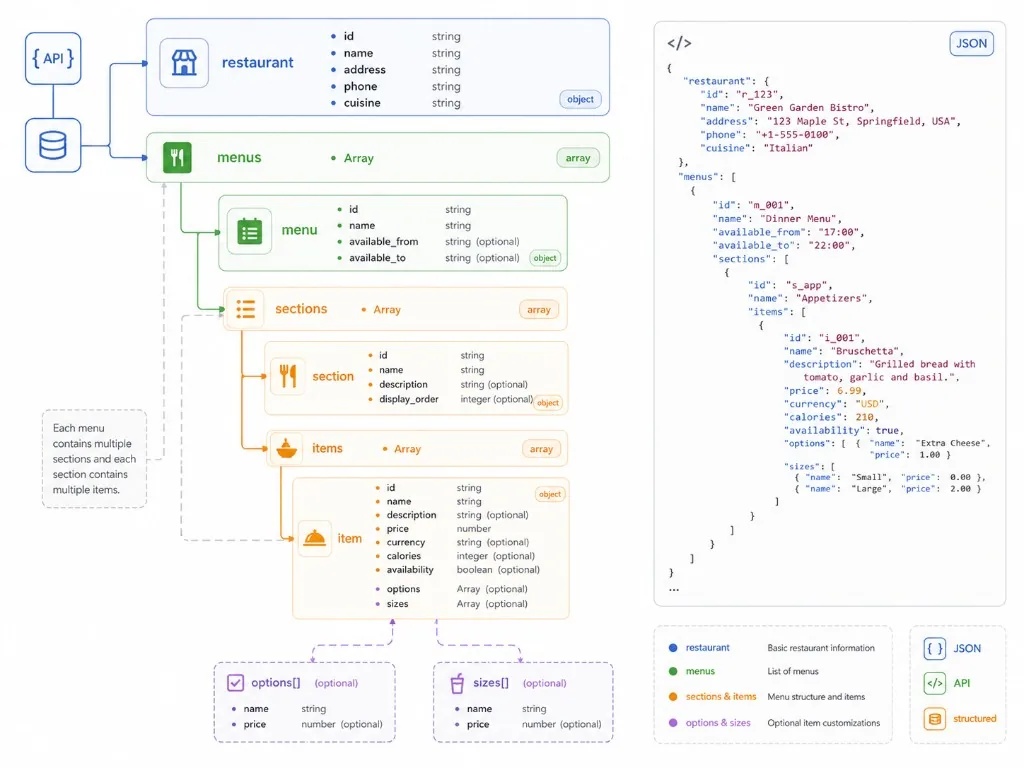
RESTAURANT
MENU
SECTION
ITEM
MODIFIERS / OPTIONS
Need this built?
We build the feed described above
Nenodata delivers restaurant, menu, item, and price records for the US cities, cuisines, or chains you name — as JSON, CSV, or a REST API, refreshed on your schedule.
Sample data explorer
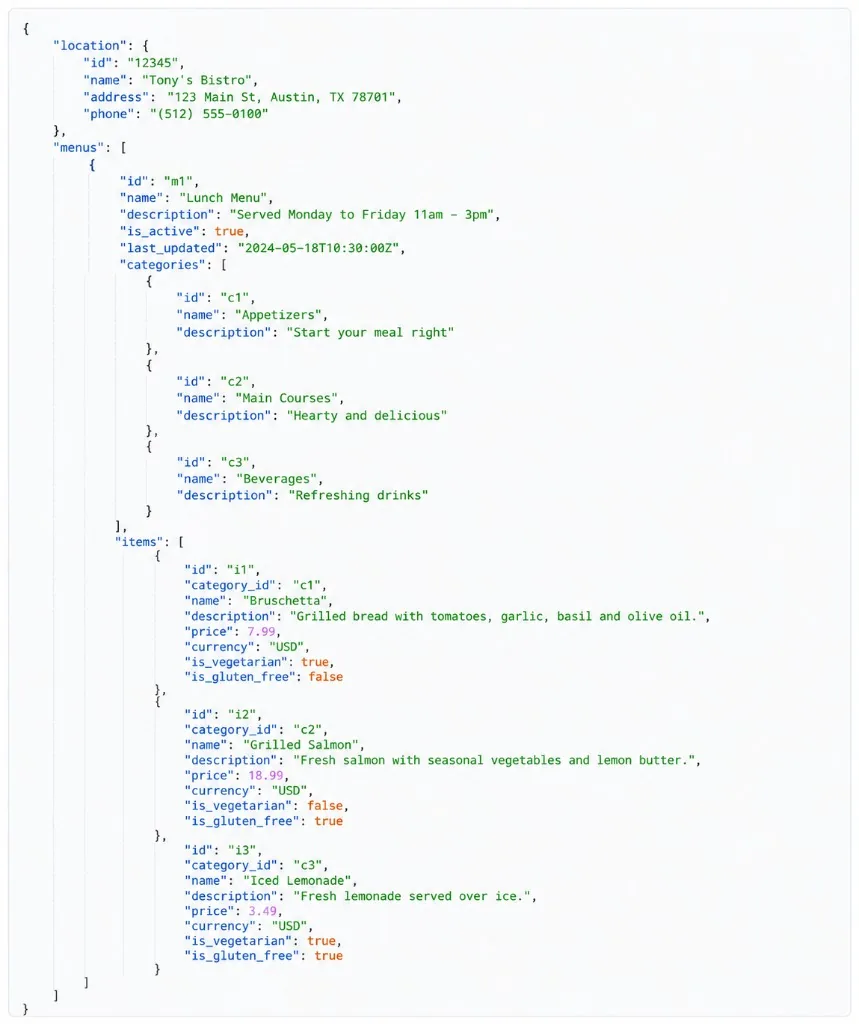
What the sample output should show
Before you commit to any provider, ask for a real sample. It should show at least one restaurant record carrying name, address, cuisine, menu category, item name, description, price, currency, source URL, collection timestamp, last-seen timestamp, and validation status.
Sample JSON, a CSV preview, a schema template, or a dashboard screenshot with anonymised records all count. A generic product demo does not.
Illustrative example — confirm actual fields during scoping.
{
  "location": {
    "id": "12345",
    "name": "Tony's Bistro",
    "address": "123 Main St, Austin, TX 78701",
    "phone": "(512) 555-0100",
    "cuisine": "Italian"
  },
  "source_url": "https://api.nenodata.com/v1/allmenus/restaurants/12345",
  "collected_at": "2026-09-02T04:15:00Z",
  "last_seen_at": "2026-09-08T04:12:00Z",
  "validation_status": "passed",
  "menus": [
    {
      "id": "m1",
      "name": "Lunch Menu",
      "description": "Served Monday to Friday 11am - 3pm",
      "is_active": true,
      "last_updated": "2026-09-02T04:15:00Z",
      "categories": [
        { "id": "c1", "name": "Appetizers" },
        { "id": "c2", "name": "Main Courses" },
        { "id": "c3", "name": "Beverages" }
      ],
      "items": [
        {
          "id": "i1",
          "category_id": "c1",
          "name": "Bruschetta",
          "description": "Grilled sourdough, tomato, basil, olive oil",
          "price": 7.99,
          "currency": "USD",
          "is_vegetarian": true,
          "is_gluten_free": false
        }
      ]
    }
  ]
}
Restaurant Name
Address
Cuisine
Menu Category
Item Name
Description
Price
Currency
Source URL
Collected At
Last Seen
Validation Status
Restaurant
id, name, address, phone, cuisine
Top-level business identity used for matching and local search.
Menus
id, name, available_from, available_to
One restaurant may expose lunch, dinner, or seasonal menus.
Sections
id, name, description, display_order
Sections preserve menu structure such as appetizers, mains, and beverages.
Items
id, name, description, price, currency, calories, availability
Item records power search, comparison, nutrition filters, and pricing workflows.
Options and sizes
options[], sizes[] with name and optional price
Optional modifiers capture add-ons, portion sizes, and variant pricing.
Buying options
Scraper API vs managed data feed
The right option depends on whether you are testing an idea or operating a repeatable business workflow.
Official API
Best for
Licensed or partner workflows
Advantages
Clearest access path where a source still offers one
Risks
Not available for AllMenus today; no public sign-up remains
DIY scraper
Best for
Internal experiments
Advantages
Full engineering control
Risks
Breaks when pages change; requires maintenance
Marketplace scraper
Best for
Fast prototype
Advantages
Quick to test; usually callable from an API client
Risks
Quality, coverage, monitoring, and support can vary
Managed data feed
Best for
Production use
Advantages
Schema design, QA, monitoring, refresh planning, delivery support
Risks
Requires project scoping
Marketplace scraper actors will return menu items, prices, cuisine types, addresses, and ratings without you writing a crawler, which makes them usable for a one-off test. What they do not answer is who owns quality control, schema changes, failed runs, duplicates, refresh cadence, and delivery into your downstream systems. Nenodata's AllMenus data API owns all of that, which is the difference between a test extract and a feed you can run a product on.
Our enterprise web scraping solutions guide covers that gap in detail — dynamic sites, anti-bot controls, validation, monitoring, scheduling, structured delivery, and governance.
When a managed feed is the better call
- the data powers a customer-facing product;
- menu prices or availability need recurring updates;
- multiple cities, cuisines, or restaurant chains are involved;
- your team needs a stable schema;
- quality issues create business risk;
- internal engineers do not want to maintain scrapers;
- the data needs to arrive through API, CSV, exports, dashboards, or warehouse-ready delivery.
Buyer pitfalls
Common mistakes when buying restaurant menu data
01
Treating a scraper endpoint as a complete data product
A scraper endpoint returns data. That does not mean the data is normalized, deduplicated, monitored, or ready for analytics. If it feeds pricing intelligence, coverage analysis, product search, or market research, the quality layer matters as much as the extraction.
Ask for:
- sample JSON or CSV;
- field definitions;
- missing-value handling;
- deduplication logic;
- refresh cadence;
- schema-change monitoring;
- error reporting.
02
Ignoring menu freshness
Restaurant menus change. Prices, item availability, delivery options, and descriptions shift without notice. Plenty of vendor pages advertise “real-time” menu data — treat that as a claim to verify, not a default.
The better scoping question: how fresh does this use case actually need to be?
Market sizing
Monthly or quarterly
Local listing enrichment
Weekly or monthly
Menu search product
Daily or weekly
Competitive menu price monitoring
Daily, hourly, or event-based
Audit or compliance workflow
Defined by internal policy
03
Confusing menu data with order data
Menu data covers restaurant names, categories, item names, descriptions, prices, cuisines, addresses, and source metadata. Order data covers transactions, accounts, customers, payments, and behaviour. Keep the scope to public restaurant and menu listing data — no provider should be offering you private, login-protected, customer, payment, or order-history data.
Menu data
- Restaurant
- Category
- Item
- Price
- Cuisine
- Location
Order / customer data
- Transactions
- Accounts
- Payments
- Customer behavior
04
Skipping legal and usage review
Public web data projects still raise contractual, privacy, and compliance questions depending on the source, method, geography, and intended use. Be wary of any vendor promising guaranteed legal compliance. We explain our process, define the project scope, and support your internal review — the review itself stays yours.
Production workflow
How a production menu data pipeline works
Extraction is one step out of seven. The rest is what keeps the feed usable three months in.
01 · Source discovery
Identify target source pages, locations, restaurant URLs, or search paths.
02 · Extraction
Collect public restaurant, menu, location, and pricing fields.
03 · Parsing and normalization
Turn page content into consistent restaurant, category, item, and price records.
04 · Validation
Check required fields, missing prices, invalid addresses, duplicate records, and unusual changes.
05 · Deduplication and matching
Resolve duplicate restaurants, repeated menu items, location variants, and inconsistent naming.
06 · Monitoring
Detect source layout changes, failed runs, missing fields, or unusual drops in record volume.
07 · Delivery
Send data through API, CSV, dashboard, export, cloud storage, or warehouse-ready feed.
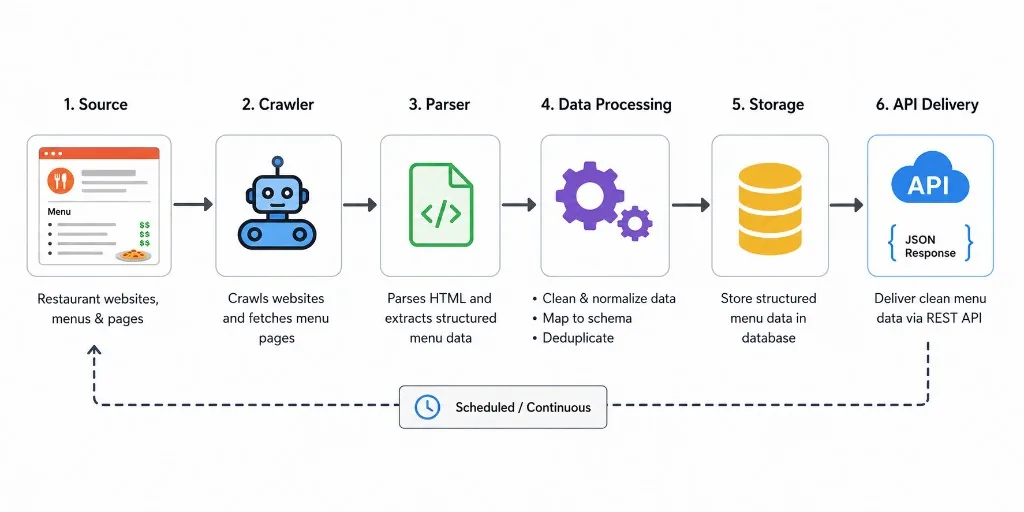
We run this model as a service across web scraping, data pipelines, API access, and monitoring. Our price intelligence work applies the same pattern to prices, promotions, stock availability, assortment changes, and product matching, with dashboards, reports, exports, and API delivery on the far end.
Managed menu feed
Nenodata AllMenus Data API: menu data without building a scraper
Nenodata’s AllMenus data API gives you the feed directly. You name the coverage and the fields; we run the collection, normalization, and validation, and deliver structured records through a REST API, JSON, or CSV on a schedule you set.
What we deliver
Restaurant records
Name, address, city, ZIP, cuisine, and ordering links for every restaurant in scope.
Full menu tree
Menus, sections, item names, descriptions, prices, currency, and modifiers where the source publishes them.
Freshness metadata
Source URL, collected_at, last_seen_at, and validation status on every record, so you can tell current data from stale.
Delivery in your shape
JSON or CSV drops, a REST endpoint, a dashboard, or a direct load into your warehouse.
Your refresh cadence
A one-off snapshot, weekly, or daily where the source supports it — quoted per project, not promised as real time.
Change tracking
Price and assortment movement between runs, when that is part of the brief.
The schema you get
The same shape shown in the sample above: restaurant profile at the top, menus and sections beneath it, items and prices at the leaves, with metadata on every record. We agree the field list and the output schema in writing before any collection starts, so nothing about the delivered file is a surprise.
See the sample record structureTypical turnaround
- 1Scoping call — you name cities, cuisines, or chains, and the fields you need.
- 2Free proof-of-concept sample within 48 hours, against your real scope.
- 3Schema and cadence agreed, then the first full delivery.
- 4Scheduled runs, each one validated and monitored for source changes.
How to start
Send the cities, cuisines, or chains you care about and the fields you need. We reply within 24 hours on business days with a sample, the schema, and a quote — no commitment before you have seen real records.
What we do not offer
- Official AllMenus access or affiliation — our API is built from public listing and menu pages.
- Guaranteed real-time menu data. Refresh cadence is set per project and quoted honestly.
- Blanket U.S. restaurant coverage. We scope coverage to the cities, cuisines, or chains you name.
- Order history, customer, or payment data. We work with public listing and menu pages only.
Related delivery models:
Provider evaluation
What to ask before choosing a menu data provider
Run this list past any API, scraper, or managed feed — including us.
Question
Why it matters
Is the access official, unofficial, scraped, or managed?
Prevents expectation and compliance mismatches
What fields are available?
Confirms fit for your product or analysis
Can I see sample JSON or CSV?
Shows whether the output is usable
How are menu changes detected?
Protects freshness-sensitive workflows
How are duplicates handled?
Improves restaurant and location matching
What happens when the source layout changes?
Reveals operational maturity
What delivery formats are supported?
Determines integration effort
What usage restrictions apply?
Helps legal and compliance review
Is monitoring included?
Reduces silent data failures
Can the provider support a proof-of-concept?
Lowers buying risk
See whether schema, field coverage, and freshness metadata match your use case.
Questions
AllMenus API FAQ
For a broader look at collecting restaurant menu data across sources beyond AllMenus, see our restaurant menu data scraping guide.
Is there an official AllMenus API?
No public one. AllMenus previously offered a REST API that returned XML and required an API key, and it was listed for private use only — there is no open sign-up for it today. Pages ranking for “AllMenus API” are almost always third-party scraper endpoints or unofficial wrappers, not official access.
What happened to developer.allmenus.com?
It is defunct. The unofficial allmenus Ruby gem was written against that developer host, so its documented endpoints no longer resolve and code built on it fails at the request stage. Treat that library as a historical reference, not a working client.
How do I get AllMenus-style menu data without an API?
Use Nenodata’s AllMenus data API. It handles crawling, normalization, deduplication, validation, and scheduled delivery to your API, CSV, or warehouse. The curl and Python examples on this page call it directly and flatten the response to one CSV row per menu item.
Is scraping AllMenus allowed?
It depends on the pages, the method, your jurisdiction, and what you do with the output. Check the site’s terms and robots directives, limit collection to public listing and menu pages, stay away from anything behind a login, and run the plan past your own legal review. No vendor can promise blanket compliance on your behalf.
What fields should a restaurant menu API return?
Restaurant name, cuisine, address, city, state, ZIP, menu category, item name, description, price, currency, dietary flags where available, source URL, collection timestamp, last-seen timestamp, and validation status. The last four matter most — without them you cannot tell a current price from a stale one.
Can restaurant menu prices be monitored over time?
Yes, if the data is collected repeatedly and stored with timestamps. Define source coverage, refresh cadence, validation rules, and change-detection logic up front; a single snapshot cannot show price movement.
Does Nenodata offer an AllMenus API?
Yes. Nenodata’s AllMenus data API delivers restaurant, menu, item, and price records, built from public listing and menu pages. You get a REST endpoint, JSON, or CSV, with the coverage, fields, and refresh cadence agreed per project. We are not affiliated with AllMenus and do not have official access to their systems.
What data does the Nenodata AllMenus API return?
Restaurant records (name, address, city, state, ZIP, cuisine, ordering links) and the full menu tree (menus, sections, item names, descriptions, prices, currency, and modifiers where the source publishes them). Every record carries source_url, collected_at, last_seen_at, and a validation status, so you can tell current data from stale.
How fast can I get AllMenus data?
Share the cities, cuisines, or chains you need and the fields you want, and Nenodata returns a free sample within 48 hours so you can check the schema and coverage before committing. Production cadence is set per project once the source scope is confirmed.
How much does an AllMenus data API cost?
Pricing depends on coverage, field set, refresh cadence, and delivery method, so it is quoted per project rather than listed as a flat rate. See the pricing page for how engagements are structured, or send your requirements for a scoped quote.
Is Nenodata affiliated with AllMenus?
No. We are not affiliated with AllMenus and we have no official AllMenus access. Nenodata’s AllMenus data API is our own service, built from public listing and menu pages, with the schema, refresh cadence, validation, and delivery format defined per project.
Restaurant menu data sample
See whether the schema, field coverage, and freshness metadata match your use case.
Tell us the cities, cuisines, or chains you need and we will send real sample JSON or CSV back.
Request your data sampleIllustrative structured record