Web Data · Updated August 2026
What Is a Live Crawler? How Real-Time Web Crawling Works
A live crawler is an automated web data system that repeatedly—or on demand—visits selected pages, detects relevant changes, extracts required information, and delivers updated results with low latency. The word “live” does not necessarily mean that every website update appears in your system at the exact instant it happens. In most implementations, it means near-real-time collection through frequent polling, priority-based monitoring, API-triggered crawls, or source-provided event notifications.
Industry providers use the term in slightly different ways. Some describe a continuously running monitoring loop, while others use it for an API that retrieves fresh data when a user or application submits a request.
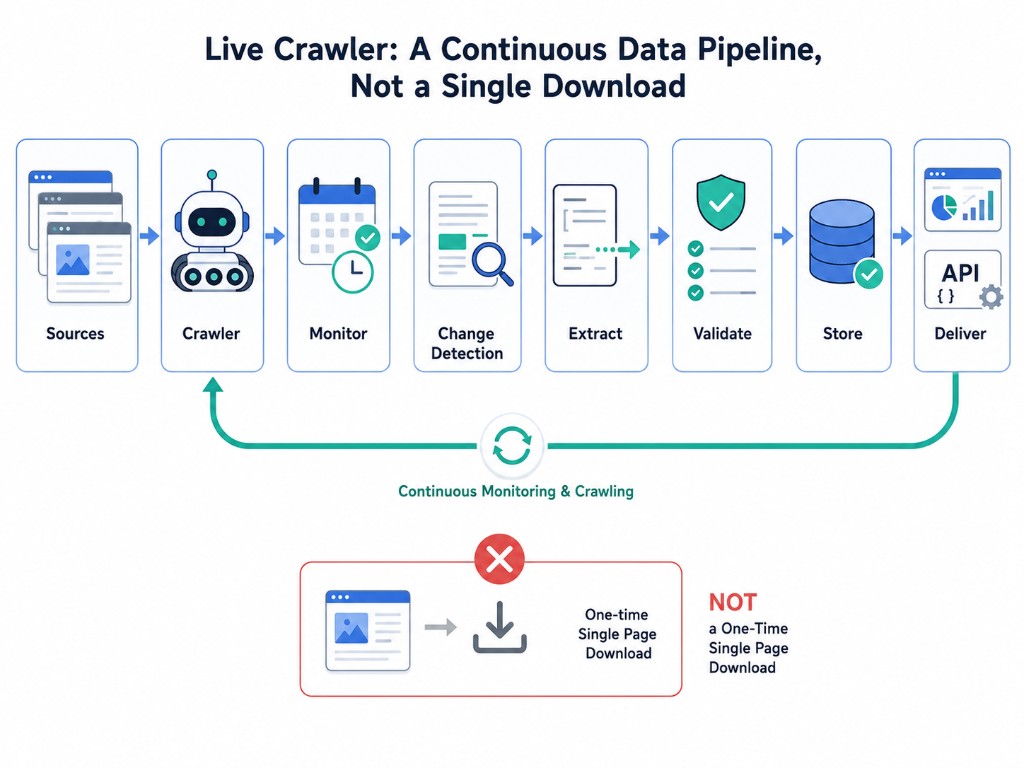
What Does “Live” Mean in Web Crawling?
“Live crawler” is an industry term rather than a single formal technical standard. Depending on the implementation, it may refer to one or more operating models:
Continuous monitoring
The crawler revisits a defined group of pages at short intervals. Pages that change frequently may be checked more often than relatively stable pages.
Priority-based polling
The crawler assigns different refresh frequencies according to business importance, historical change patterns, or detected volatility. A product price page might be checked more frequently than a company policy page.
On-demand crawling
An application sends a URL, search term, product identifier, or other input to an API. The crawler retrieves the latest available page content, extracts the requested fields, and returns the result.
Event-triggered collection
When a source provides an API, feed, webhook, sitemap update, or another notification mechanism, the system may use that event to start a targeted crawl.
Most public websites do not actively notify an external crawler whenever their pages change. As a result, “live” crawling commonly depends on intelligent scheduling and repeated checks rather than a permanently open connection to every source.
How Does a Live Crawler Work?
A production live-crawling workflow usually combines six stages.
1. Define the targets and freshness requirement
The team identifies:
- websites or pages to monitor
- fields to extract
- acceptable data delay
- geographic or device requirements
- delivery format
- expected volume
The required refresh rate should be tied to a real business decision. A fifteen-minute delay may be acceptable for some pricing workflows, while a daily update may be sufficient for slower-moving market research.
2. Schedule or trigger the crawl
A scheduler selects the next URL according to priority, previous change frequency, retry status, and rate limits. On-demand systems may instead start a crawl when an application submits a request.
3. Retrieve and render the page
The crawler requests the page and, when necessary, loads content rendered through JavaScript. It may need to manage sessions, pagination, cookies, regional variations, or other elements that affect the visible result.
4. Detect meaningful changes
It may use:
- HTTP validators such as ETag or Last-Modified
- content hashes
- DOM or structural fingerprints
- field-level comparisons
- timestamps supplied by the source
Conditional HTTP requests can reduce unnecessary transfers by allowing a server to return a not-modified response when a resource has not changed.
5. Extract, clean, and validate the data
When a relevant change is found, the extraction layer converts the page into structured fields. The data may then be normalized, deduplicated, checked against validation rules, and compared with previous records. A strong system distinguishes a meaningful business change—such as a new price—from an irrelevant page change such as a rotating banner or updated session token.
6. Deliver the update
The final record can be sent to downstream systems through:
- an API
- a webhook
- a database or data warehouse
- a message queue
- a dashboard
- an alert
- a CSV, JSON, or spreadsheet export
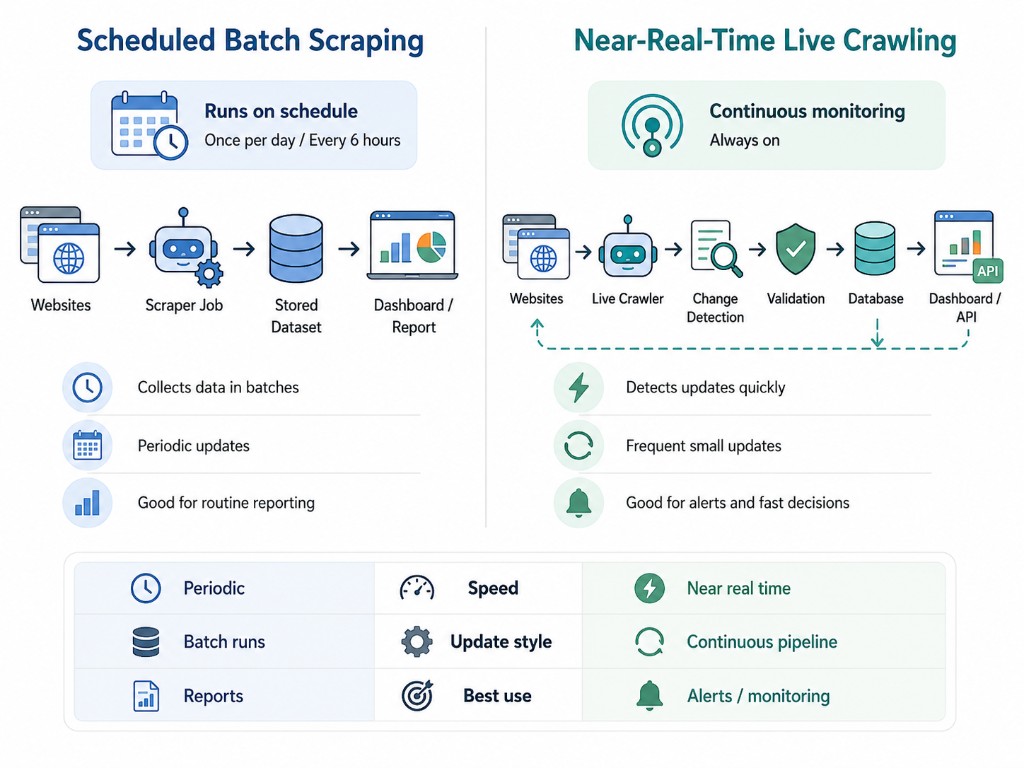
Live Crawler vs Traditional Crawler vs Scheduled Scraper
Crawling and scraping often work together, but they describe different functions. Crawling primarily discovers or revisits pages, while scraping extracts selected information from those pages. For a broader overview of how crawling fits into web data collection, see our data crawling guide.
| Feature | Traditional web crawler | Scheduled web scraper | Live crawler |
|---|---|---|---|
| Primary purpose | Discover and index pages | Extract selected data in batches | Monitor and deliver changing data quickly |
| Trigger | Crawl queue or periodic run | Fixed schedule | Frequent schedule, priority trigger, or API request |
| Typical latency | Hours to weeks | Minutes to days | Seconds to minutes, depending on the source and setup |
| Stored state | URL and crawl history | Previous datasets or run logs | Detailed page and field-level state |
| Output | URLs, metadata, or page content | Structured batch dataset | Updated records, events, alerts, or fresh API responses |
| Best suited to | Search indexing and broad discovery | Reporting and historical analysis | Time-sensitive operational decisions |
The most important difference is not simply speed. A live crawler is usually designed around freshness, state tracking, change detection, and immediate delivery.
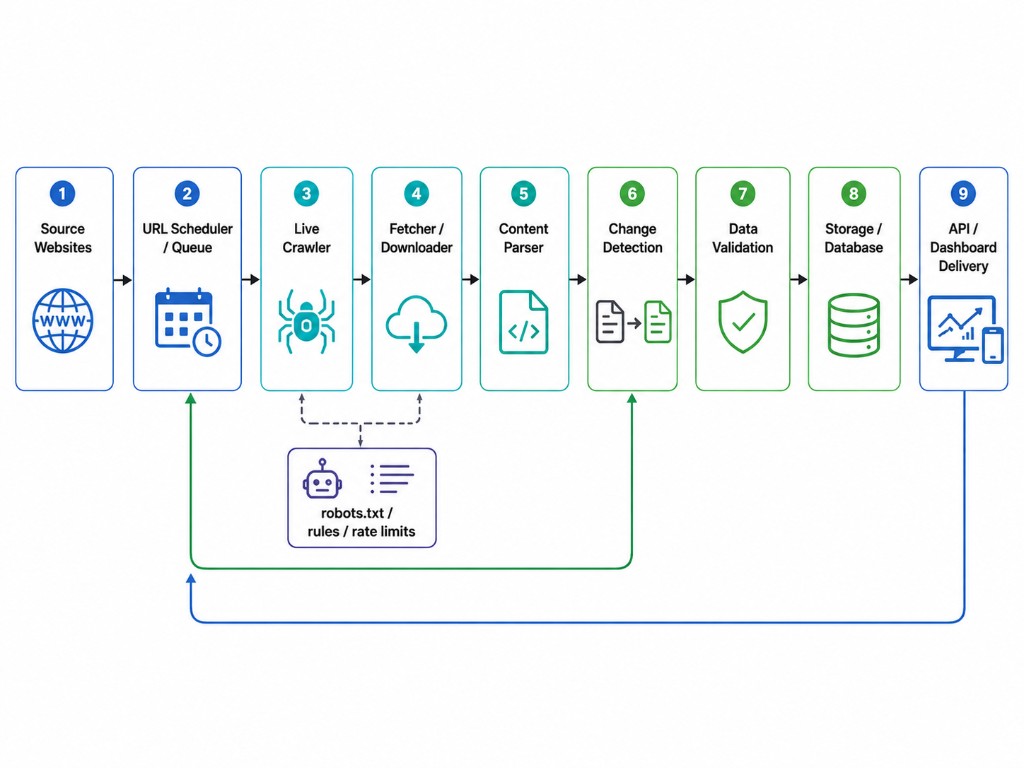
Core Components of a Live-Crawling System
A reliable system commonly includes:
The architecture is stateful because each new observation must be evaluated against information collected previously.
Common Live-Crawler Use Cases
Competitor price monitoring
Retail and ecommerce teams can monitor prices, discounts, shipping charges, stock status, and assortment changes. Updates can feed pricing dashboards or alert teams when a defined threshold is reached. See Nenodata's price intelligence capabilities for related monitoring workflows.
Product availability tracking
A live crawler can detect when an item enters or leaves stock, a seller changes, or a product listing disappears. This can support assortment planning, marketplace analysis, and supply monitoring.
Travel and hospitality monitoring
Hotel rates, room availability, flight prices, rental availability, and promotions can change frequently. Low-latency collection supports travel and hospitality data workflows.
Job and real-estate listing feeds
Recruitment and property platforms can use low-latency collection to identify newly published listings, status changes, price adjustments, removed posts, or updated descriptions.
News and regulatory monitoring
Organizations can watch selected public sources for announcements, policy changes, filings, press releases, or other material updates. The crawler can send the changed content into an alerting or review workflow.
AI and retrieval systems
A live crawler can refresh the source material used by a search, retrieval-augmented generation, or knowledge-management application. This reduces reliance on a static index when source freshness matters.
Explore industry data solutions for additional use-case patterns across retail, travel, research, and AI workflows.
Benefits of Live Crawling
Fresher operational data
Teams can make decisions from newer observations instead of waiting for the next daily or weekly batch.
Automated change detection
Users do not have to compare pages or datasets manually. The system can isolate changed fields and notify the relevant workflow.
Faster downstream action
A detected update can automatically trigger a webhook, workflow, pricing rule, review queue, or dashboard refresh.
Reduced unnecessary processing
Change detection and conditional requests can prevent unchanged pages from being fully processed on every visit.
Consistent data structure
The system can normalize information from different layouts into a shared schema for analytics or application use.
These benefits should be balanced against infrastructure cost, source restrictions, required freshness, and the business value of receiving the update sooner.
Challenges of Live Web Crawling
Balancing freshness and request volume
Shorter intervals increase infrastructure usage and the load placed on source websites. Refresh rates should reflect how often the source changes and how quickly the business must respond.
Dynamic and changing websites
JavaScript rendering, infinite scrolling, regional variations, experiments, and layout updates can break extraction rules or produce inconsistent results.
False change detection
Advertisements, timestamps, randomized identifiers, recommendations, and session-specific content can make a page appear different even when the business data has not changed.
Data quality at speed
Low latency has limited value when records are incomplete, duplicated, incorrectly matched, or delivered without validation.
Rate limits and access controls
Sites may restrict automated requests through technical controls, account requirements, terms, or published crawling policies.
Failure recovery
An always-running system must handle request failures, source downtime, parsing errors, delayed delivery, and schema changes without silently losing coverage.
Is Live Crawling Legal?
There is no universal answer for every source, jurisdiction, data type, and use case. A responsible crawling plan should consider:
- the website's terms and published policies
- robots.txt instructions
- authentication and access restrictions
- copyright and database rights
- privacy and personal-data requirements
- contractual restrictions
- request frequency and server impact
- applicable local laws
The Robots Exclusion Protocol is a method for service owners to communicate how crawlers are requested to access their URI space. It is an important technical signal, but it does not resolve every contractual, privacy, or legal question by itself.
Organizations should obtain appropriate legal advice for sensitive, regulated, personal, restricted, or high-risk data collection. A crawler should not be treated as authorization to access private or protected information.
When Should You Use a Live Crawler?
A live crawler is a strong fit when:
- the source changes frequently
- decisions lose value when data is delayed
- selected fields can be clearly defined
- updates must enter another system automatically
- monitoring must cover many pages consistently
- the value of faster detection justifies the added complexity
A scheduled batch process is often more appropriate when:
- the source changes only occasionally
- daily or weekly data is sufficient
- the dataset is mainly used for historical reporting
- immediate alerts do not change the business response
- the source offers a suitable licensed API or data feed
- frequent crawling would create unnecessary cost or load
The correct question is not simply, “Can this be crawled live?” It is, “How fresh must this data be for the decision it supports?”
Live Crawler vs Website Change Monitor
A website change monitor usually focuses on notifying a person that visible content has changed. It may provide a screenshot, highlighted text, or page-level alert.
A live crawler generally goes further by:
- monitoring many pages;
- extracting specific fields;
- maintaining structured historical state;
- validating records;
- sending data directly into applications and analytics systems.
A change monitor may be sufficient for watching a handful of pages. A live crawler is better suited to repeatable data pipelines and machine-readable outputs.
Building In-House vs Using a Managed Solution
An internal crawler may be appropriate when the target set is small, the source structure is stable, and the organization has engineering capacity for ongoing maintenance.
A managed approach may be more practical when the workflow includes multiple sources, JavaScript rendering, high-volume monitoring, validation rules, operational alerts, and delivery integrations. See enterprise web scraping for managed extraction and monitoring workflows.
The comparison should include more than initial development cost. Teams should also account for:
- source-layout maintenance
- monitoring and incident response
- data validation
- retry handling
- infrastructure
- security
- compliance review
- downstream integration
How Nenodata Supports Web Monitoring Workflows
Nenodata helps teams define their target sources, required fields, collection frequency, validation requirements, and preferred delivery method before building the associated web-data workflow. Its web-scraping capabilities include scheduled crawling, real-time monitoring, alerts, API delivery, webhook delivery, and structured formats such as JSON and CSV.
Need to evaluate a time-sensitive web-data requirement?
Frequently Asked Questions
Is a live crawler the same as a web scraper?
Not exactly. A crawler handles page discovery, retrieval, revisiting, and scheduling. A scraper extracts selected information from the retrieved content. A live-crawling system commonly combines both: the crawler monitors sources, and the scraper converts relevant changes into structured records.
Does "live" mean the data is completely instantaneous?
Usually not. In most cases, live means low-latency or near-real-time. The delay depends on crawl frequency, page-response time, rendering requirements, extraction, validation, and delivery. An on-demand crawler may return a fresh observation when requested, while a monitoring crawler may revisit pages at short intervals.
Can a live crawler monitor JavaScript-heavy websites?
It can when the crawler includes a browser-rendering or compatible data-access layer. Dynamic sites are more resource-intensive than static pages and can require additional session, interaction, or rendering logic.
How often can a live crawler check a page?
The appropriate frequency depends on how often the page changes, the target website's policies and capacity, the number of URLs, infrastructure limits, and the required business response time. Not every page should be checked at the same interval.
What formats can live-crawler data use?
Common outputs include JSON, CSV, spreadsheets, API responses, webhook payloads, database records, message-queue events, dashboards, and alerts. The correct format depends on the downstream system and whether the data is intended for people, software, or both.
Can a live crawler access any website?
No. Technical accessibility does not equal permission. Authentication, website policies, legal restrictions, privacy requirements, robots instructions, rate limits, and technical controls must all be considered before collection begins.
What should be defined before building a live crawler?
Define the target sources, exact data fields, freshness requirement, geographic context, expected volume, validation rules, failure handling, historical-storage needs, delivery format, and the business action that follows each update.
Related Services & Reading
- Live Crawler Services — Managed near-real-time monitoring and delivery
- Enterprise Web Scraping — Large-scope extraction and scheduled collection
- Enterprise Web Crawling — Discovery and revisit workflows at scale
- Price Intelligence — Competitor pricing datasets fed by frequent crawls
- Data Crawling Guide — Crawling vs scraping fundamentals
- Price Scraping Explained — Pricing-focused extraction workflows
Conclusion
A live crawler is not simply a conventional scraper running faster. It is a stateful monitoring and delivery system designed to turn changing web content into fresh, structured data.
The strongest implementations combine intelligent scheduling, responsible retrieval, reliable change detection, structured extraction, validation, and automated delivery. They also define “real-time” according to a measurable business requirement rather than treating maximum crawl frequency as the goal.