Solutions · Financial Data
Financial Data Solutions for Automated Research, Monitoring, and Intelligence
Financial data solutions help teams collect, structure, validate, and deliver financial information from public websites, reports, PDFs, filings, APIs, directories, and business documents. For fintech, investment research, private equity, banking technology, and business intelligence teams, the real goal is not more data—it is clean, usable financial data that supports research workflows, dashboards, internal tools, alerts, and reporting.
Nenodata supports this through AI-powered data extraction, web scraping, document processing, custom data pipelines, API access, and monitoring—turning information into structured outputs such as JSON, CSV, Excel, CRM feeds, warehouse feeds, or API delivery.
Nenodata does not provide investment advice, stock recommendations, market predictions, or guaranteed financial outcomes. A financial data solution should help teams collect and organize information; it should not replace professional financial judgment.
When Do Businesses Need Financial Data Solutions?
A business usually needs a financial data solution when valuable information is spread across too many sources or formats.
| Problem | What it looks like | Why automation helps |
|---|---|---|
| Manual data collection | Analysts copying data from reports, websites, filings, or PDFs | Reduces repetitive work and improves consistency |
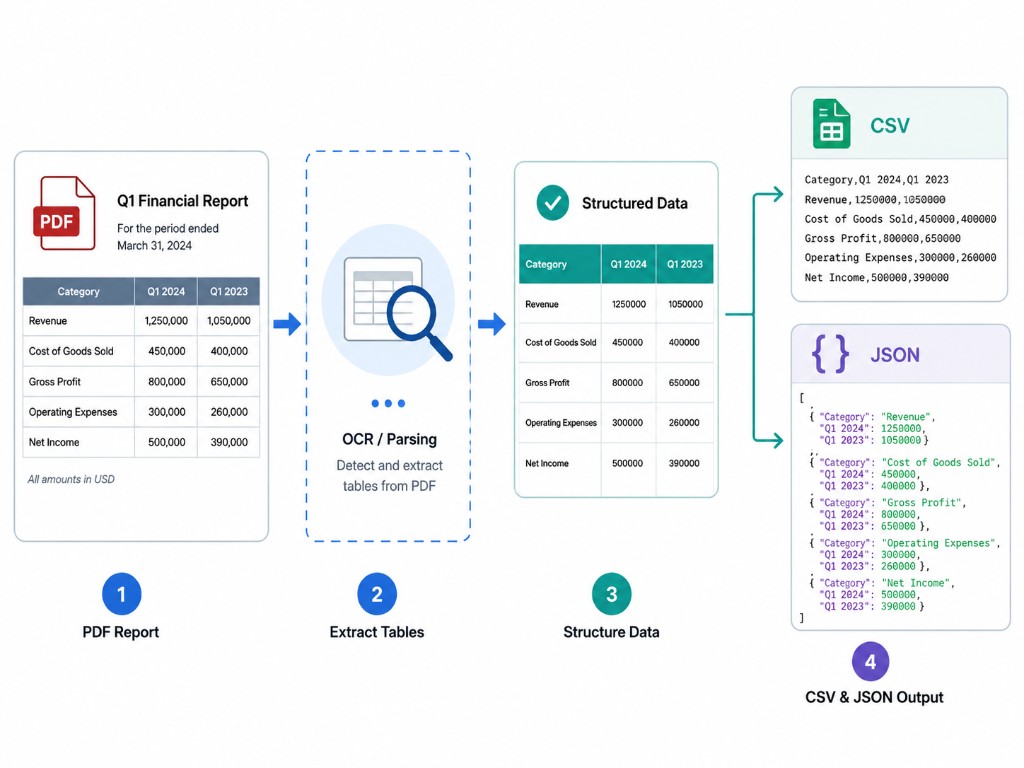
| Unstructured financial documents | Tables inside PDFs, scanned statements, invoices, or reports | Converts document data into usable fields |
| Fragmented sources | Data split across public websites, APIs, directories, reports, and spreadsheets | Combines source data into one structured workflow |
| Inconsistent formats | Different date formats, currencies, company names, and field labels | Normalizes data for reporting and analysis |
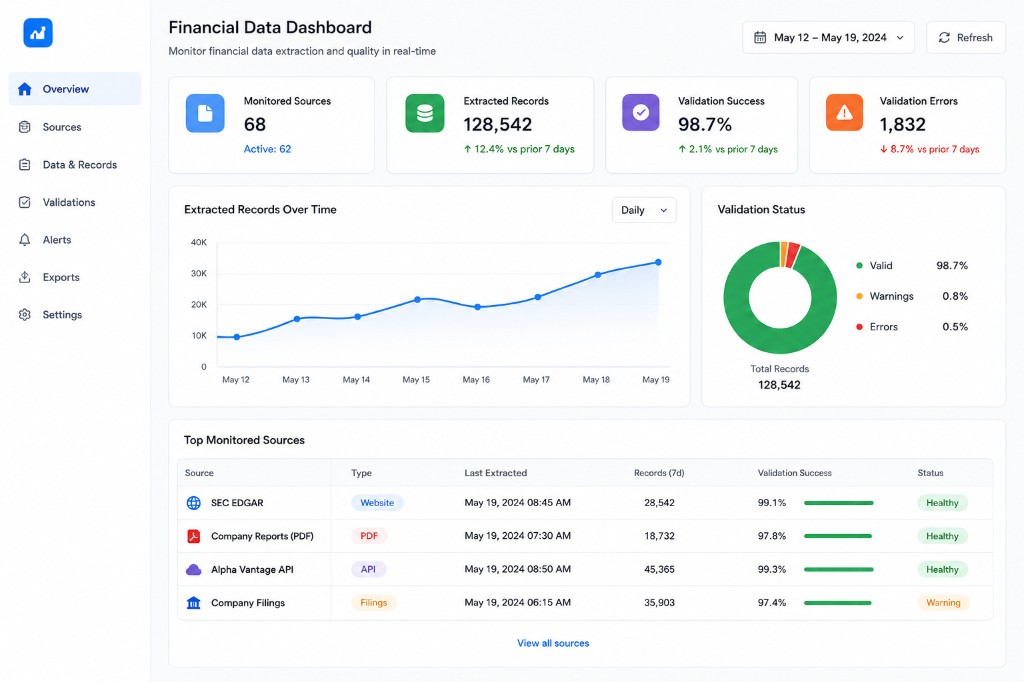
| Slow monitoring | Teams checking source pages manually for updates | Supports scheduled checks and alert workflows |
| Poor delivery format | Data arrives as raw pages or files instead of structured output | Delivers CSV, JSON, API, database, or dashboard-ready data |
For example, a fintech company may need structured data from public company pages, financial reports, and third-party APIs. A private equity team may need firmographic data, leadership information, and source URLs. A market research team may need to monitor public announcements, pricing pages, or industry reports.
What Counts as Financial Data?
Financial data is broader than stock prices. It includes structured and unstructured information for research, reporting, monitoring, risk review, and business intelligence.
| Source type | Example data | Typical output |
|---|---|---|
| Public websites | Company profiles, branch pages, product pages, fee pages, investor pages | CSV, JSON, database, dashboard |
| Financial reports | Revenue tables, balance sheet fields, notes, KPIs, period data | Structured tables, JSON, CSV |
| PDFs and scanned documents | Statements, invoices, forms, financial summaries | Extracted fields with review flags |
| Regulatory filings | Filing metadata, forms, disclosures, company facts | API feed or structured database |
| News and announcements | Leadership changes, company events, public updates | Alerts, monitoring dashboard |
| Business directories | Company name, industry, location, contact fields | Enriched CRM or research database |
| Existing APIs | Licensed or public API data | Normalized feed combined with other sources |
For U.S. public company information, the SEC provides EDGAR search tools and APIs for filings, company facts, and bulk data. Teams still need to normalize, combine, validate, and deliver data into their own systems.
How Nenodata Supports Financial Data Workflows
Financial data work often requires web extraction, document processing, validation, pipelines, and delivery together—connect to a source, extract fields, transform and validate, then deliver to CRM, warehouse, API, or export files.
1. Public Web Data Extraction
Some financial information lives on public websites but not in a clean downloadable format: company pages, investor pages, fee pages, directories, and announcements. Web scraping services can collect specific fields, retain source URLs, and output CSV, JSON, or database-ready records when the source is public and permitted for your use case.
Data crawling vs. scraping — educational context for multi-page collection workflows.
2. Financial Document Processing
Reports, invoices, receipts, statements, PDFs, and scanned documents may contain critical tables and fields. Financial document processing supports table recognition, custom field extraction, validation, and delivery via JSON, CSV, XML, API, or webhook.
3. Data Cleaning and Normalization
Standardize company names, dates, currencies, percentages, source URLs, duplicates, field names, and extraction timestamps so combined datasets remain comparable—e.g. aligning "revenue," "net sales," and "total revenue" where appropriate.
4. API, CSV, Warehouse, and Dashboard-Ready Delivery
Analysts may need CSV or Excel; developers JSON or API access; BI teams warehouse or dashboard-ready feeds via custom data pipelines.
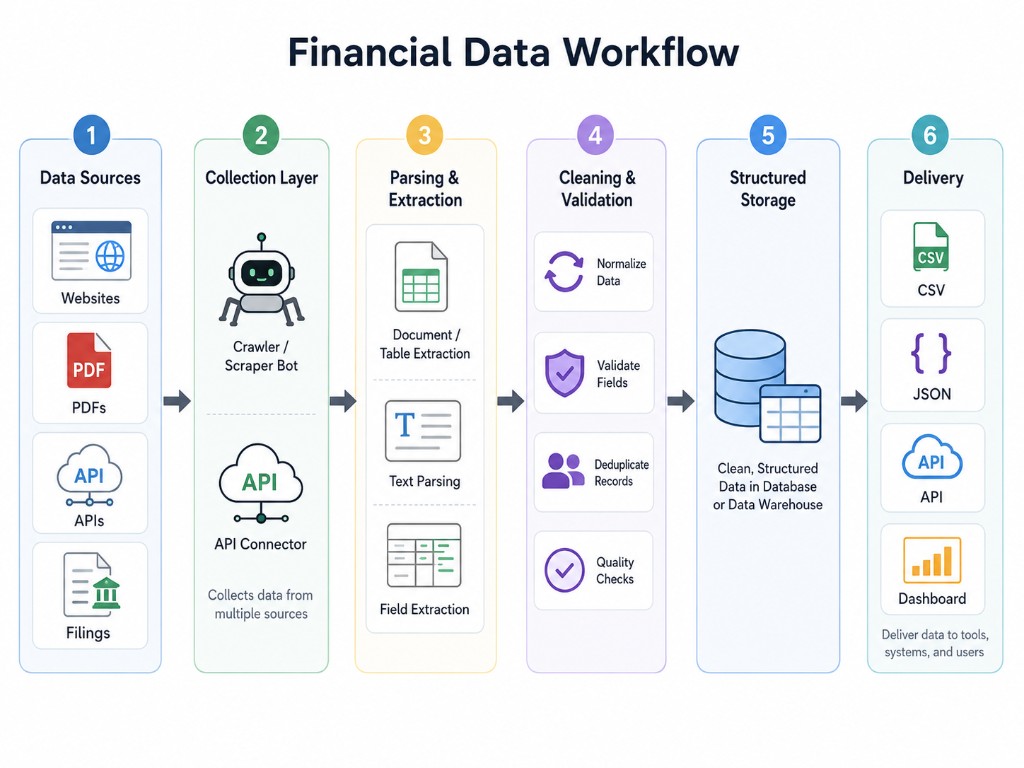
After workflow overview—for solution-aware readers.
Finance Use Cases Nenodata Can Support
Investment Research Workflows
Collect public company information, filings, reports, announcements, and sector signals so analysts spend less time collecting and more time reviewing. Nenodata is a data automation partner—not an investment advisor or trading signal provider.
Private Equity and Company Research
Structured company data for screening: names, websites, locations, industries, leadership pages, funding signals, and source URLs. See lead generation and enrichment for directory and CRM enrichment workflows. Verify any volume or accuracy claims during scoping in sales materials.
Financial Document Automation
Recurring document workflows: invoices, receipts, bank statements, and financial reports with consistent output fields.
Market and Competitor Monitoring
Monitor public pages for updates—pricing, product pages, announcements—with scheduled refreshes and change detection. Avoid claiming live licensed exchange data unless Nenodata has approved access for that use case.
Financial Data API vs Dataset vs Custom Extraction
| Option | Best for | Limitation |
|---|---|---|
| Financial data API | Standardized data already available from a provider | May not include niche sources or custom fields |
| Dataset marketplace | Packaged datasets for common use cases | Less control over source coverage and schema |
| Web extraction workflow | Public websites, directories, announcements, product pages, investor pages | Requires source review and maintenance |
| Document processing | PDFs, reports, invoices, statements, and scanned files | Requires field validation and review rules |
| Custom data pipeline | Multi-source workflows with recurring delivery | Requires clear scope, schema, and monitoring plan |
Many finance teams use a hybrid workflow—e.g. SEC APIs for official filings, document processing for PDFs, and custom extraction for company websites or directories.
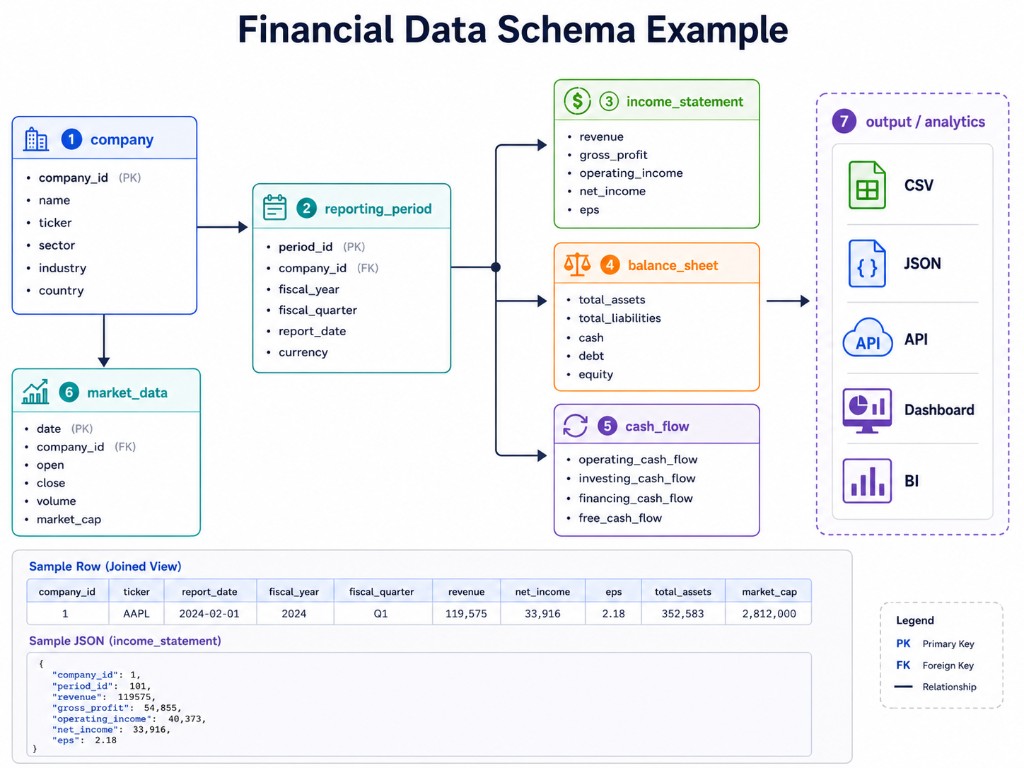
Recommended Financial Data Schema
Define the target schema before building. This planning example is not a verified Nenodata production dataset—generate a real sample from approved public sources during scoping.
| Field | Purpose |
|---|---|
| company_name | Identifies the entity |
| source_url | Keeps traceability to the original source |
| source_type | Website, PDF, filing, API, directory, report |
| report_period | Connects data to a financial period |
| metric_name | Revenue, assets, operating income, fee, product count, etc. |
| metric_value | Extracted numeric or text value |
| currency | Required for financial comparison |
| page_number | Useful for PDF/report extraction |
| extracted_at | Shows when the record was collected |
| review_status | Flags approved, needs review, or failed extraction |
| confidence_note | Explains uncertainty or validation issue |
How to Choose a Financial Data Solutions Partner
- Can the provider handle both websites and documents?
- Can they extract tables from PDFs and reports?
- Can they preserve source URLs and extraction timestamps?
- Can they normalize company names, dates, currencies, and metrics?
- Can they deliver data in the format your team needs?
- Can they support scheduled refreshes or monitoring?
- Can they explain what sources are allowed and what sources are restricted?
- Can they provide a small sample before a full build?
- Can they flag uncertain records for review?
- Can they adapt when source layouts change?
For most projects, the best next step is a small sample extraction using real target sources, fields, and output requirements—not a long generic sales deck.
Request a Custom Financial Data Sample
Nenodata can scope workflows involving public web extraction, financial document processing, structured delivery, API access, and monitoring. Send:
- 3–5 example source URLs or documents
- Required fields and preferred output format
- Refresh frequency and validation rules
- Access, licensing, or compliance constraints
Confirm any free proof-of-concept offer on the contact page before using it as a primary CTA.
Already have sources? Send Source URLs
Related financial workflows: StockAnalysis scraper, finance & stock market data scraping, SOS business registry scraper, SEC Form D scraper, and document processing.
FAQs
What are financial data solutions?
Financial data solutions help teams collect, structure, validate, and deliver financial information from public websites, reports, PDFs, filings, APIs, directories, and business documents for research, BI, monitoring, and internal tools.
Does Nenodata provide investment advice?
No. Nenodata provides data extraction, document processing, and delivery workflows. It does not provide investment advice, stock recommendations, market predictions, or guaranteed financial outcomes.
What sources can financial data workflows use?
Common sources include public company websites, financial reports, PDFs, regulatory filings such as SEC EDGAR, business directories, licensed or public APIs, and news or announcement pages—always subject to source permissions and your legal review.
What is the difference between a financial data API and custom extraction?
A financial data API provides standardized fields from a vendor. Custom extraction builds workflows for specific websites, documents, or fields that packaged APIs may not cover, with delivery to CSV, JSON, warehouse, or your own API.
Can Nenodata extract data from financial PDFs and reports?
Yes. Document processing workflows can target invoices, receipts, bank statements, financial reports, and tables inside PDFs—with validation and review flags before delivery.
What output formats are supported?
Common formats include JSON, CSV, Excel, XML, API endpoints, webhooks, database feeds, and integrations with CRM or warehouse systems depending on project scope.
Nenodata Editorial Team · Financial data extraction for research and BI teams. Not investment advice.