MLS Scraper for Real Estate Listing Data
Nenodata builds managed listing data pipelines for approved, public, or authorized real estate sources—with structured outputs, monitoring, and delivery into your product and operations workflows.
For API-oriented property data, see the Real Estate API. For a named US portal, see the Zillow scraper. For rental lease inventory, see rental market data scraping.
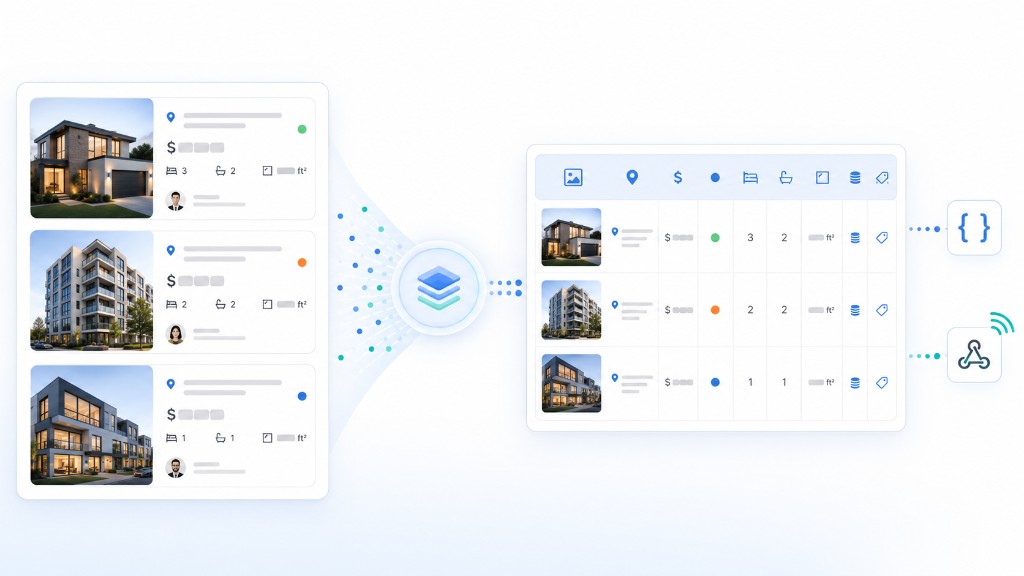
The problem: listing data is scattered, fragile, and hard to operationalize
Real estate listing information often lives across portals, broker pages, feeds, partner sources, and market-specific pages that change layout, load dynamically, and expose fields inconsistently. Teams that depend on manual research or one-off scripts struggle to keep records current across the sources they are permitted to use.
Without normalization and reliable delivery, listing extracts are difficult to trust for search products, analytics, CRM workflows, and internal reporting. Nenodata helps teams move from fragmented inputs toward structured listing pipelines scoped for operational use—subject to approved source permissions and field review.
What Nenodata's MLS Scraper Workflow Provides
Nenodata provides managed listing extraction workflows for teams that need structured property data from approved, public, partner, or customer-authorized sources. Depending on scope, pipelines can support search experiences, market analytics, investor screening, broker workflows, listing monitoring, and internal reporting.
Nenodata does not claim access to private, restricted, login-protected, or licensed MLS systems without customer authorization. Source permissions should be reviewed before implementation. This workflow focuses on authorized listing pipelines—not single-portal Zillow extraction, rental lease monitoring, or mobile app marketplace scraping. Related capabilities include real estate app data scraping, US real estate data scraping, real estate data intelligence, Web Scraping, Data Pipelines, and Monitoring for dynamic-source workflows where appropriate.
Sample output / proof
Illustrative example — confirm actual fields during scoping.
Illustrative real estate listing record shown as JSON and a structured table
JSON response
{
  "listing_id": "EXAMPLE-12345",
  "source_url": "https://example.com/listing/example-12345",
  "property_address": "123 Example Street",
  "city": "Austin",
  "state": "TX",
  "postal_code": "78701",
  "status": "Active",
  "list_price": 725000,
  "bedrooms": 4,
  "bathrooms": 3,
  "square_feet": 2450,
  "lot_size_sqft": 6200,
  "property_type": "Single family",
  "broker_or_agent": "Example Brokerage",
  "listing_date": "2026-05-01",
  "last_updated": "2026-06-22T09:00:00Z",
  "latitude": 30.2672,
  "longitude": -97.7431,
  "image_url": "https://example.com/images/listing.jpg"
}
Table view
| Listing ID | Address | List price | Status | Beds | Baths | Last updated |
|---|---|---|---|---|---|---|
| EXAMPLE-12345 | 123 Example Street, Austin, TX | $725,000 | Active | 4 | 3 | 2026-06-22 |
Actual fields, schema, and output format are scoped after source review and customer requirements.
Data fields and outputs
Source → Normalize → Deliver
Grouped real estate listing data fields organized by property details, pricing, location, source metadata, and delivery format
Property details
Listing ID, property type, bedrooms, bathrooms, square footage, lot size, and image references can be scoped where publicly available on approved sources.
Pricing and status
List price, status, price-change markers, listing date, and last-updated timestamps for monitoring and analytics workflows.
Location context
Address components, city, state, postal code, and latitude or longitude fields where permitted and available on scoped sources.
Source metadata
Source URL, broker or agent context, collection timestamps, and source-specific identifiers for traceability and matching.
Delivery options
CSV, JSON, API, webhook, spreadsheet, database, dashboard, or scheduled feed delivery can be scoped after format review.
Use cases
Property search experiences
Product teams can feed structured listing records into search, filter, and discovery workflows without manual copy-and-paste research.
Market analytics
Analysts can compare listing activity, pricing signals, and status changes across approved sources in a consistent schema.
Investor screening
Investment teams can screen properties using normalized attributes, pricing context, and listing status from scoped public sources.
Broker and CRM workflows
Brokerage teams can route listing-level signals into CRM or operations workflows when field access and permitted use are confirmed.
Listing monitoring
Operations teams can track listing changes, status updates, and pricing movement across monitored records instead of one-off page checks.
Reporting and internal tools
Data teams can load recurring listing outputs into spreadsheets, databases, warehouses, or internal reporting tools.
Who this is for
This service is for PropTech founders, Real estate marketplaces, Brokerages, Investor teams, Analysts, and Enterprise data teams that need structured listing data from approved sources without relying on brittle one-off scripts or manual collection.
How it works
Review sources and requirements
Define approved sources, target markets, required fields, schema needs, delivery format, and refresh expectations.
Build the extraction workflow
Nenodata configures collection workflows for the approved public, partner, or customer-authorized sources in scope.
Clean, normalize, and validate
Records are normalized to agreed field rules, validated where defined, and prepared for downstream systems.
Deliver to your systems
Receive structured listing data through the agreed format, such as file export, API, webhook, or scheduled feed.
Why choose Nenodata
Source-first scoping
Source permissions, field access, and feasibility are reviewed before implementation—not assumed from a generic scraper template.
Managed pipeline delivery
Nenodata operates the configured extraction and delivery workflow so internal teams can focus on product and analysis use cases.
Schema fit for your product
Field names, formatting rules, and downstream schema mapping can be planned during scoping for engineering and data teams.
Monitoring for changing sources
Listing pages and dynamic sources can be monitored with workflows scoped for changing layouts and field behavior where supported.
Delivery into existing tools
Outputs can be scoped for databases, dashboards, CRM workflows, spreadsheets, APIs, webhooks, or scheduled feeds after format review.
Integrations and delivery
Nenodata can scope delivery for product, analytics, CRM, and engineering workflows. Confirm supported formats before implementation.
Compare with the Nenodata real estate data API for API-oriented property data workflows, the Zillow scraper for portal-specific collection, or rental market data scraping for lease inventory monitoring.
Structured real estate listing data delivered to a database, dashboard, CRM workflow, and API webhook
Product database
Load normalized listing records into application databases or internal catalog systems.
Analytics dashboard
Feed recurring listing outputs into dashboards or BI workflows for market visibility.
CRM workflow
Route listing-level signals into CRM or brokerage operations workflows where fields and use are approved.
API or webhook
Deliver structured records through API-oriented or webhook-based workflows confirmed during scoping.
Spreadsheets
Use CSV or Excel exports for manual review, analyst collaboration, and ad hoc reporting.
Scheduled feed
Recurring file or feed delivery can be scoped where supported for listing monitoring use cases.
Change alerts
Alerting for listing or pricing changes can be discussed during scoping where technically feasible.
FAQ
This page is not legal advice and does not guarantee compliance. Customers should confirm permitted collection, storage, and use with appropriate guidance.
Scope your listing data workflow with Nenodata
Bring the sources you are allowed to use, the fields you need, your preferred delivery format, target markets, and authorization details. Nenodata will help define the right extraction workflow during scoping.